

Checking PDF/UA without firing up a Windows VM
Categories: Development
A lot of what I do with the speedata Publisher ends up as accessible PDF. PDF/UA-1 is a common customer requirement, and the Publisher has been producing tagged PDFs for a while now. So I spend more time than I would like to admit checking PDFs for accessibility compliance.
The de-facto tool for this is PAC from the PDF Association. It is good, it is free, and it is Windows-only. On macOS that means firing up a Windows VM every time I want to check a single file, and I started to dread it enough that I built my own.
So there are now two new things:
- pdfa11y, a command line PDF/UA conformance checker written in Go.
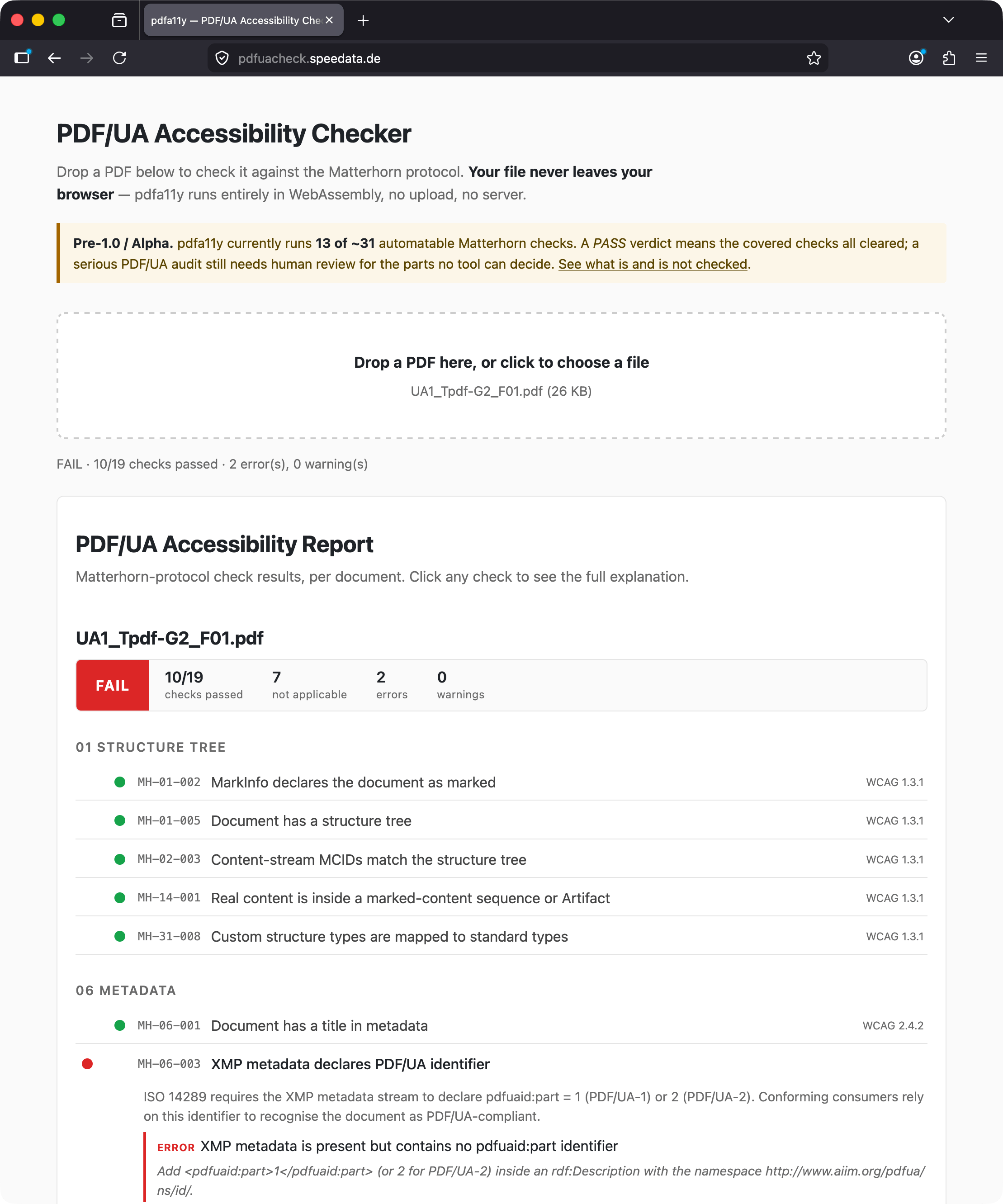
- pdfuacheck.speedata.de, the same checker compiled to WebAssembly. You drop a PDF on the page, the check runs locally in your browser, the file never leaves the machine.
Both run the same set of Matterhorn Protocol checks (the standard catalog of PDF/UA failure conditions). The current set covers around 19 conditions, which is far from the full 136 in the protocol, but it includes the ones that come up most often in practice: missing /ToUnicode maps, fonts that are not embedded, structure tree shape, untagged content, MCID consistency between the content stream and the structure tree, heading hierarchy, list structure, and a few more.
How it compares to PAC
To get a feel for how close (or far) pdfa11y is to PAC, I run it against the pdfa.org technique sample PDFs (82 files at the time of writing, CC-BY-4.0). Current match rate is around 62%. The mismatches are almost all things that need a human to look at the page (is this paragraph really supposed to be a heading? does this figure represent text?) or that need deep glyph analysis to detect.
Where pdfa11y disagrees with PAC, it tends to be stricter rather than more lenient. There are no known false positives on the corpus, just genuine failure conditions that pdfa11y currently does not detect.
The library underneath
To parse PDFs without dragging in a full-featured library, I split out the parsing layer as pdfdisassembler. It is a read-only PDF parser focused on tooling: validators, accessibility checkers, debuggers. No writing, no rendering, no signing, no XFA. It handles classical xref and xref streams, the common stream filters, text-string decoding, the standard encryption handler, structure tree traversal, and a small content-stream tokenizer.
The WASM build of pdfa11y is around 7.5 MB compressed. Most of that is the Go runtime; the actual PDF parsing code is small. Loading a 100-page document and running the full check set takes around half a second in the browser.
What it does not do
pdfa11y will not tell you whether your document is meaningful. It cannot decide whether the structure tree reflects the visual layout, whether the alt texts describe the figures, or whether the reading order makes sense. Those are exactly the things PAC also marks as “human checks” in the Matterhorn protocol. They need a human in the loop. The point of an automated checker is to clear the mechanical failures so you can focus on the judgment calls.
The other thing it does not do is render the PDF. There is no preview, no contrast check, no visual diff. If you need that, PAC is still the answer, and on macOS the Windows VM still has to come out for the final pass. But for the everyday “does my Publisher output still pass” check, the browser tab is enough.
Try it
pdfuacheck.speedata.de is the easiest way in. For batch use or CI, grab the Linux, macOS and Windows binary from the GitHub releases or go install github.com/speedata/pdfa11y/cmd/pdfa11y@latest.
Bug reports and reference PDFs that produce surprising verdicts are very welcome on the issue tracker.